
在线客服
请联系我们的客户服务:
邮件客户端专用:QuickQ 中国版VPN
您可通过以下联系方式随时与我们取得联系:
- Email: [email protected]
- QQ功能即将上线
- TG频道:敬请期待
关于 专为中国大陆用户设计的QuickQ VPN 的常见问题解答
QuickQ VPN中国版的使用指南
- Should you try to log in on a new device and surpass the device limit, you will be redirected to the "Unbind Device" page, allowing you to disconnect any linked devices.
- Additionally, you can go to "Menu" > "App Settings" > "Device List" to choose and unbind a device you prefer.
用户名或密码丢失是常见问题,我们致力于简化恢复流程。以下是您的选项:
- 若您忘记用户名,请联系我们并提供支付记录截图以协助找回。
- If you’ve misplaced your password, simply use the "forgot password" option found in the app.
全局模式设置: 该设置会为所有网络活动启用VPN,这可能会导致本地网站和应用程序的加载速度变慢。
分流模式: 此设置仅对因地理位置受限的网站(如Google、YouTube和Netflix)启用VPN,同时保持对国内网站本地网络访问的畅通。
您可以在应用设置中更改路由模式。
If you experience difficulties reaching certain websites or apps, consider switching to "Global Mode."
若您还需更多帮助,请随时联系我们。
通过邀请好友注册即可积攒积分,并利用这些积分兑换丰厚奖励。具体机制如下:
- First, obtain your "Referral Code" or "Referral Link" by navigating to "Share & Gift" and clicking on "Share Now." Afterward, you can send it to friends or share it on your social media accounts or blog.
- 每当有朋友通过您的推荐链接成功注册,您即可获得1个积分,该积分可兑换为期一天的通行证。
- After you have exchanged your points, you can see your redeemed plans in the "My Account" section.
- 为了成功计入推荐奖励,您的好友不仅需要下载该应用,还必须实际使用它。如果好友仅下载而未投入使用,您将无法获得相应的推荐积分,直到他们开始使用为止。
QuickQ VPN 中国区提供的分流模式能够支持通过 HTTPS 访问的网页应用,例如 Telegram、WhatsApp 和 Gmail。该模式可同时调整 HTTP(端口 80)和 HTTPS(端口 443)的路由规则,从而让用户访问这些应用的网页版。不过需要注意的是,这些应用的客户端版本可能会使用其他不同的端口。
为保障顺利访问,请执行以下步骤:
- Utilize the "Global Mode" option found in the routing settings.
- 请调整应用的代理设置。以LINE应用为例,以下是修改其代理设置的具体步骤:
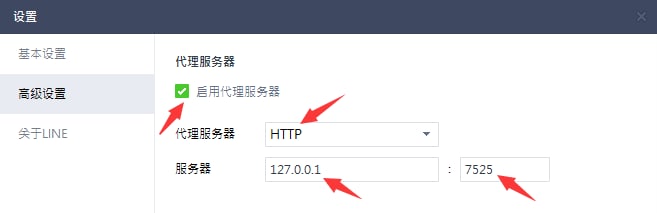
常见的网络故障原因包括:
- 未使用VPN时的本地网络速率低下情况
- 特定VPN服务器节点的用户流量显著增加
为了解决这些问题,建议您尝试以下几种方法:
- 请短暂关闭VPN,以测试您本地的网络速度
- 在关闭VPN的情况下,尝试切换WiFi、4G或5G等不同网络环境,以排查具体的连接故障。例如,若发现WiFi信号不稳定,建议改用移动数据网络。
- 先关闭VPN,切换至其他服务器节点,再重新建立连接
- 若希望保持连接至同一地理区域,请断开并重新连接,这样有可能使您接入同一区域内的其他服务器。
- 持续执行这些测试,直到找到最契合您需求的服务器为止。
通过网关处理付款时偶尔会出现延迟,请留意以下关键事项:
- 我们支持多种支付方式,包括支付宝、微信扫码支付以及银联支付。
- 若付款成功但账户内暂未显示对应计划,请静候约五分钟,随后注销并重新登录以刷新数据。
- 若按上述操作后问题仍未解决,请截取支付确认页面的截图,并联系我们获取进一步帮助。
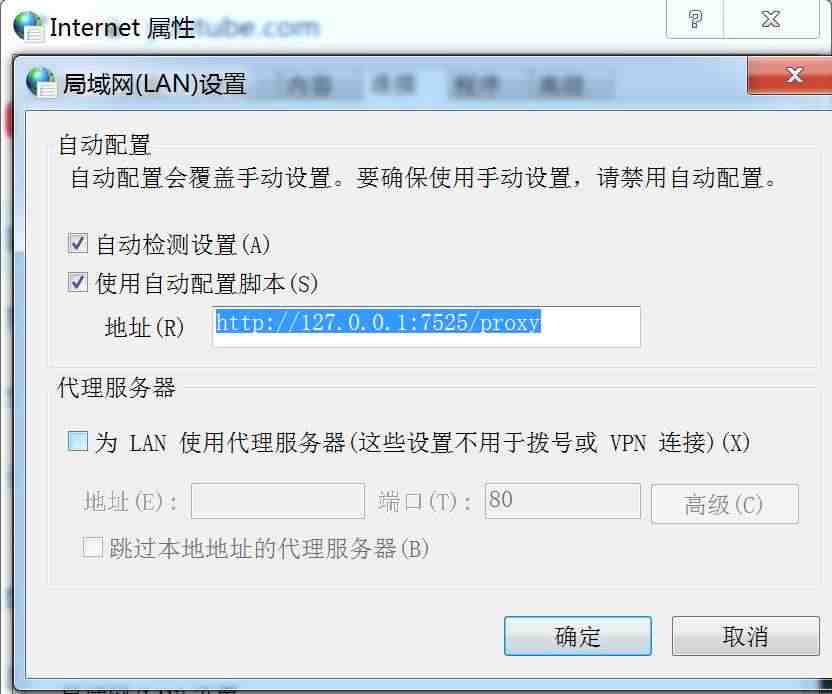
出现此类问题大多源于系统代理配置错误或被其他软件拦截,建议手动填入专为中国大陆用户设计的QuickQ VPN提供的代理地址以恢复正常使用。
具体操作请参照以下流程:
- 于Windows环境下查找并启动“Internet选项”对话框。
- 请切换至“连接”选项卡。
- 请点击界面右下角的“局域网设置”选项。
- 请进入局域网(LAN)配置界面,勾选“启用自动配置脚本”复选框,随后在下方提供的地址栏内填入:https://quickqbox.cn//en:7525/proxy。
- 请点击右下角的“确定”按钮,随后再次点击“确定”关闭Internet属性窗口。
- 最后,请完全关闭浏览器,随后重启浏览器即可体验流畅的网络访问服务。
如下图所示:
专为中国大陆用户设计的QuickQ VPN的安装教程
When setting up the 专为中国大陆用户设计的QuickQ VPN app on Windows, you might receive alerts from your antivirus or firewall software, as VPN applications can be seen as possible threats. If you receive these alerts, it's advisable to select options like "allow," "agree," or "trust" to proceed with the installation. This step is crucial for the VPN to operate effectively, as it requires changes to proxy settings. Denying these permissions could impede the normal functioning of 专为中国大陆用户设计的QuickQ VPN.
关于QuickQ中国版VPN
专为中国大陆用户设计的QuickQ VPN offers a 30-day money-back guarantee, allowing you a risk-free opportunity to try out all its features. If it doesn't meet your expectations within the first 30 days, you can request a full refund. Here’s what you need to do:
- 请前往QuickQ中国版VPN的官方网站首页进行访问。
- 请根据您的偏好选择订阅方案,我们提供按月或按年的灵活选项。
- 请输入电子邮件完成注册,并使用信用卡或PayPal完成付款。
- 请将QuickQ中国区VPN下载安装至您的设备,支持iOS、Windows、Android及macOS系统。
- 请按照提供的说明配置适用于中国的QuickQ VPN,并登录新账户以开始使用相关服务。
- 若您在前30天内对服务不满意,请及时联系 专为中国大陆用户设计的QuickQ VPN联系客服申请退款。
Kindly note: It is important to fully understand 专为中国大陆用户设计的QuickQ VPN's refund policy. If you're unhappy with the service, you can easily initiate a refund request.
To register for a 专为中国大陆用户设计的QuickQ VPN Membership Account:
- Go to the 专为中国大陆用户设计的QuickQ VPN Website: Launch your web browser and navigate to the official 专为中国大陆用户设计的QuickQ VPN website.
- 挑选合适的订阅方案请根据您的具体需求选择最合适的订阅方案,无论是月付、半年付还是年付皆可。
- 注册账号: 点击订阅或购买按钮,并使用您的电子邮箱地址注册,该邮箱将作为您的账号ID。
- 完成支付流程:选择您偏好的支付方式,例如信用卡或 PayPal,并完成交易。
- 查收邮件确认及设置指南: After the payment is processed, 专为中国大陆用户设计的QuickQ VPN will send you a confirmation email with setup instructions, a download link, and an activation code.
- 安装与配置: Follow the instructions in the email or on the website to download and install 专为中国大陆用户设计的QuickQ VPN on your device. When you open the app for the first time, enter the activation code or your login credentials.
- 立即体验我们的服务应用安装完毕并完成登录后,请挑选一个服务器节点,即可开启安全浏览之旅。
重要提示: Always make sure to purchase your subscription directly from the official 专为中国大陆用户设计的QuickQ VPN website or authorized distributors. Avoid buying from unauthorized sources or third-party vendors to safeguard your financial and personal information.
To register for 专为中国大陆用户设计的QuickQ VPN, you typically follow these steps:
注册流程:
- 前往官方 专为中国大陆用户设计的QuickQ VPN 请使用您偏好的网页浏览器访问该网站。
- 挑选一个符合您需求的订阅套餐。
- Enter a valid email address to get your 专为中国大陆用户设计的QuickQ VPN account information and installation guidelines.
- 您可以选择信用卡或PayPal等自己惯用的支付方式。
- Follow the payment instructions provided by 专为中国大陆用户设计的QuickQ VPN to finish the transaction.
- 付款完成后,请查收电子邮件,里面会有确认信息及后续安装指南。
- Download the 专为中国大陆用户设计的QuickQ VPN application by following the directions in the email or on the website.
- Log into the application using your new account credentials, select a server, click "Connect," and start using 专为中国大陆用户设计的QuickQ VPN.
- (Optional) Follow similar steps to install and configure 专为中国大陆用户设计的QuickQ VPN on other devices.
Always ensure your account information is kept private and adhere to 专为中国大陆用户设计的QuickQ VPN’s service terms and usage policies for a secure and legal use of the service. If you encounter any problems during the registration or setup process, 专为中国大陆用户设计的QuickQ VPN customer support is usually available to help.
Sharing a paid 专为中国大陆用户设计的QuickQ VPN account usually means that a subscriber is sharing their login details, such as their username and password, with others. This allows those who have not purchased the service to access the advantages of a paid subscription. However, this practice comes with several potential downsides.
法律与合约风险:
- 违反服务协议: Sharing your 专为中国大陆用户设计的QuickQ VPN account typically violates the service agreement, which often forbids account sharing.
- 潜在的法律后果共享账号可能引发法律风险,因为这可能被认定为侵犯版权或从事非法活动。
安全隐患提示:
- 对个人资料安全的威胁: Granting others access to your 专为中国大陆用户设计的QuickQ VPN account heightens the risk to your personal data security, particularly if their activities are unknown to you.
- 隐私保护问题若他人冒用你的账户行事,可能会导致你的隐私泄露,且这些行为最终均可追溯至你本人。
性能表现问题:
- 服务质量下降: If multiple users access 专为中国大陆用户设计的QuickQ VPN through one account, it may result in reduced connection speeds and lower service quality.
- 并发连接数限制: 专为中国大陆用户设计的QuickQ VPN restricts the number of devices that can connect simultaneously on a single account, which can be quickly exceeded with shared usage.
声誉与伦理方面的担忧:
- 对运营商收入的影响账号共享会导致服务提供商收入下降,进而影响其服务及产品供应的可持续性。
Although sharing a 专为中国大陆用户设计的QuickQ VPN account may appear to be a cost-saving strategy, it presents various risks and challenges. It is strongly recommended that individuals maintain separate accounts to ensure a secure, lawful, and high-quality service experience.
A modified version of 专为中国大陆用户设计的QuickQ VPN that is cracked is an unauthorized adjustment of the official application, enabling use without payment. Although it may seem appealing due to its no-cost nature, there are considerable risks and issues related to its use:
法律相关事项
- 侵犯知识产权使用破解软件属于违法行为,侵犯了多个司法管辖区内的知识产权。
- 法律后果使用破解版软件可能会引发法律纠纷,进而面临罚款或其他处罚。
安全威胁
- 恶意软件风险:破解版软件中常潜藏木马、病毒或其他有害程序。
- 个人信息安全隐患您的敏感数据(包括用户名、密码及财务信息)面临更高的泄露风险。
- 可靠性难题盗版软件通常无法像正版软件那样运行高效且稳定可靠。
隐私保护问题
- 缺乏数据保护机制使用破解软件时,无法确保您的数据受到安全的加密保护。
- 遭受追踪与监控的风险:破解版往往无法达到正规服务提供商所秉持的隐私保护标准,甚至可能记录或追踪您的在线行为。
伦理道德与声誉方面的挑战
- 道德考量使用破解软件会损害开发人员的努力与奉献。
- 经济后果: 使用破解软件会侵蚀企业收入,进而威胁其正常有效的运营能力。
如果您高度重视数据安全与隐私,并希望符合伦理及法律规范,选择正规且信誉良好的服务商是最佳方案。许多值得信赖的平台提供免费试用或退款保障,便于您安心体验服务。
Download the official 专为中国大陆用户设计的QuickQ VPN using the link below.
Get the official 专为中国大陆用户设计的QuickQ VPN by clicking the link below.
我们发现部分用户在选定区域后,难以完成服务器的选择。
为简化操作流程,当前界面仅展示地区选项。Heibao 将自动为您连接至所选地区内性能最优的服务器。具体详情如下:
- 位置菜单仅显示各大洲或地区,每个区域都包含数百个服务器节点。选定某个地区后,Heibao会根据您当前的网络状况,自动为您连接至性能最佳的那台服务器。
- 如果您对当前连接的服务商感到不满意,可以选择断开连接并重新接入同一地区,系统将会为您分配另一台服务器。
- 请持续尝试此步骤,直到找到一个完全符合您使用需求的服务器为止。
Certainly! 专为中国大陆用户设计的QuickQ VPN grants continuous free access through its "Daily Check-in" feature. Each day you check in, you’ll get 15 minutes of complimentary usage. Furthermore, you can accumulate points by inviting friends, which can be traded for a 1-day pass. Here’s more information:
- 专为中国大陆用户设计的QuickQ VPN offers ongoing access via its daily check-in system.
- 新用户可享15分钟免费时长,后续每日签到即可再获15分钟免费额度。
- 在免费试用期期间,用户享有无限流量,但仅可连接特定地区的服务器。
- 通过我们的推荐计划获取积分,这些积分可用于兑换多种订阅方案。
Definitely! 专为中国大陆用户设计的QuickQ VPN supports multi-device connectivity under a single account, with the actual number of allowable devices depending on your subscription plan. Here are more details:
- You can log into your 专为中国大陆用户设计的QuickQ VPN account from any device including Android, iOS, macOS, or Windows by using the same user information.
- 您能同时连接的设备数量取决于所选套餐。理论上,可链接的设备数量没有上限。
- 若尝试连接的设备数量超出套餐允许范围,系统会要求在登录前断开其他设备的连接。
- Each device can be associated with up to two 专为中国大陆用户设计的QuickQ VPN accounts whether it is a computer or a mobile device.
当然可以,我们提供免费的试用服务!每天我们都开放15分钟的体验时长。想要开始试用,只需按以下步骤操作:
- Download the 专为中国大陆用户设计的QuickQ VPN app
- 注册一个新账号
- Click the "Daily Check-In" button located on the main page
请注意:免费试用名额有限,且我方保留随时终止该优惠而无需另行通知的权利。
专为中国大陆用户设计的QuickQ VPN prioritizes privacy, assuring that it does not maintain any logs of user activities or connections. Additionally, the company guarantees that no information is stored that could link specific network actions or behaviors to individual users.
关于iOS的问题
单个账户支持绑定多台设备,具体数量上限取决于您选择的订阅套餐。关于此功能,请务必注意以下几点:
- 您的账户支持跨平台登录,无论最初是在Android、iOS、macOS还是Windows上注册的,均可在其他设备上使用。
- 支持的设备数量取决于所选择的订阅套餐,部分计划允许单个账户连接无限数量的设备。
- 若已连接设备数量超出套餐限额,系统将发送通知,提醒用户在登录时移除多余设备。
- 无论是电脑还是移动设备,每款终端最多可绑定两个账户。
Certainly! You can access 专为中国大陆用户设计的QuickQ VPN free of charge indefinitely via the "Daily Check-in" feature. Every day, you receive 15 minutes of complimentary usage time. Furthermore, for each successful referral, you earn 1 point that can be exchanged for a 1-day pass. Here are the key details:
- 专为中国大陆用户设计的QuickQ VPN guarantees the availability of the "Daily Check-in" feature for free indefinitely.
- 新用户注册即享15分钟免费时长,次日完成签到还可额外获赠15分钟体验时间。
- 在免费试用期间,您可以毫无限制地畅享我们的所有服务。不过需要注意的是,免费套餐仅支持访问特定地区的服务器。
- 通过参与我们的推荐计划积累积分,这些积分可用于兑换多种类型的套餐。
当然可以!我们提供每天15分钟的免费试用体验。如需开始试用,请按照以下步骤操作:
- Download the 专为中国大陆用户设计的QuickQ VPN application.
- 注册一个新账号.
- Press the "Daily Check-In" button on the main interface of the app.
请注意,此项免费试用活动的可用性可能会发生变动,且我们保留随时终止该活动且不另行通知的权利。
专为中国大陆用户设计的QuickQ VPN prioritizes user privacy, guaranteeing that no logs of activities or connections are retained. Additionally, the VPN service refrains from storing any data that might be utilized to trace particular network activities or behaviors back to an individual user.
While there are free 专为中国大陆用户设计的QuickQ VPN and proxy services available, using free 专为中国大陆用户设计的QuickQ VPN is typically not advisable as they often do not include the privacy and security features present in paid 专为中国大陆用户设计的QuickQ VPN. Free 专为中国大陆用户设计的QuickQ VPN often delivers poor performance, may jeopardize your data by selling it, and generally fail to offer adequate protection against possible cyber threats.
Although iPhones enable users to connect to VPN servers via their system settings, this function by itself does not ensure comprehensive VPN services. To make the most of VPN features, it is necessary to link to an external VPN provider like 专为中国大陆用户设计的QuickQ VPN.
在iOS设备上使用VPN能有效保障您的网络活动安全。您可以从丰富的服务器地点中自由选择,从而更换设备IP地址,在公共Wi-Fi环境下保护数据隐私,并突破地域限制获取受限内容。
专为中国大陆用户设计的QuickQ VPN provides a protective shield for your iOS device while you're online, establishing a secure barrier against surveillance, tampering, and content restrictions. With 专为中国大陆用户设计的QuickQ VPN, you can fully enjoy streaming, online shopping, and web browsing, confident that your privacy and security are effectively managed.
关于Android的相关疑问
Certainly! You can access 专为中国大陆用户设计的QuickQ VPN free of charge indefinitely via the "Daily Check-in" feature. Every day, you receive 15 minutes of complimentary usage time. Furthermore, for each successful referral, you earn 1 point that can be exchanged for a 1-day pass. Here are the key details:
- 专为中国大陆用户设计的QuickQ VPN guarantees the availability of the "Daily Check-in" feature for free indefinitely.
- 新用户注册即享15分钟免费时长,次日完成签到还可额外获赠15分钟体验时间。
- 在免费试用期间,您可以毫无限制地畅享我们的所有服务。不过需要注意的是,免费套餐仅支持访问特定地区的服务器。
- 通过参与我们的推荐计划积累积分,这些积分可用于兑换多种类型的套餐。
当然可以!我们提供每天15分钟的免费试用体验。如需开始试用,请按照以下步骤操作:
- Download the 专为中国大陆用户设计的QuickQ VPN application.
- 注册一个新账号.
- Press the "Daily Check-In" button on the main interface of the app.
请注意,此项免费试用活动的可用性可能会发生变动,且我们保留随时终止该活动且不另行通知的权利。
专为中国大陆用户设计的QuickQ VPN prioritizes user privacy, guaranteeing that no logs of activities or connections are retained. Additionally, the VPN service refrains from storing any data that might be utilized to trace particular network activities or behaviors back to an individual user.
在安卓设备上设置VPN,能让你确保所有网络活动的安全性。只需连接至我们众多的VPN服务器之一,即可更改设备IP地址,保护公共Wi-Fi网络上的数据,并访问被屏蔽的网站和服务。
虚拟私人网络(VPN)通过虚拟连接多台计算机来构建虚拟网络。它最初是为了提升速度和安全性而设计的,如今则主要用于保护隐私、加密数据以及访问受限内容。
关于Windows的疑问
单个账户支持绑定多台设备,具体数量上限取决于您选择的订阅套餐。关于此功能,请务必注意以下几点:
- 您的账户支持跨平台登录,无论最初是在Android、iOS、macOS还是Windows上注册的,均可在其他设备上使用。
- 支持的设备数量取决于所选择的订阅套餐,部分计划允许单个账户连接无限数量的设备。
- 若已连接设备数量超出套餐限额,系统将发送通知,提醒用户在登录时移除多余设备。
- 无论是电脑还是移动设备,每款终端最多可绑定两个账户。
Certainly! You can access 专为中国大陆用户设计的QuickQ VPN free of charge indefinitely via the "Daily Check-in" feature. Every day, you receive 15 minutes of complimentary usage time. Furthermore, for each successful referral, you earn 1 point that can be exchanged for a 1-day pass. Here are the key details:
- 专为中国大陆用户设计的QuickQ VPN guarantees the availability of the "Daily Check-in" feature for free indefinitely.
- 新用户注册即享15分钟免费时长,次日完成签到还可额外获赠15分钟体验时间。
- 在免费试用期间,您可以毫无限制地畅享我们的所有服务。不过需要注意的是,免费套餐仅支持访问特定地区的服务器。
- 通过参与我们的推荐计划积累积分,这些积分可用于兑换多种类型的套餐。
当然可以!我们提供每天15分钟的免费试用体验。如需开始试用,请按照以下步骤操作:
- Download the 专为中国大陆用户设计的QuickQ VPN application.
- 注册一个新账号.
- Press the "Daily Check-In" button on the main interface of the app.
请注意,此项免费试用活动的可用性可能会发生变动,且我们保留随时终止该活动且不另行通知的权利。
专为中国大陆用户设计的QuickQ VPN prioritizes user privacy, guaranteeing that no logs of activities or connections are retained. Additionally, the VPN service refrains from storing any data that might be utilized to trace particular network activities or behaviors back to an individual user.
By utilizing 专为中国大陆用户设计的QuickQ VPN on your Windows computer, you can ensure that all your activities remain secure. When you link to one of our 专为中国大陆用户设计的QuickQ VPN server locations, you replace your device's IP address with a fresh one, protect your data on hazardous Wi-Fi networks, and access blocked websites and services.
Although free 专为中国大陆用户设计的QuickQ VPN and proxy services are available, free 专为中国大陆用户设计的QuickQ VPN is generally not recommended because they often lack the privacy and security measures found in paid 专为中国大陆用户设计的QuickQ VPN Free 专为中国大陆用户设计的QuickQ VPN frequently underperform, might endanger your data by selling it, and usually do not provide sufficient protection against potential cyber attacks.
Getting started is easy! Just sign up for 专为中国大陆用户设计的QuickQ VPN, install the app on your device, and press the "On" button that appears on your screen.
Although Windows 10 and 11 come with a VPN client, it does not provide a comprehensive VPN service. To fully enjoy the advantages, you must connect to a third-party VPN such as 专为中国大陆用户设计的QuickQ VPN. The setup process can be somewhat complicated, leading many to prefer using the 专为中国大陆用户设计的QuickQ VPN app instead.
VPN通过在网络上连接多台计算机来构建一个虚拟网络。起初,它旨在提升速度和安全性,但如今其主要功能已转向保护隐私、数据加密以及访问受限内容。
关于macOS的疑问
单个账户支持绑定多台设备,具体数量上限取决于您选择的订阅套餐。关于此功能,请务必注意以下几点:
- 您的账户支持跨平台登录,无论最初是在Android、iOS、macOS还是Windows上注册的,均可在其他设备上使用。
- 支持的设备数量取决于所选择的订阅套餐,部分计划允许单个账户连接无限数量的设备。
- 若已连接设备数量超出套餐限额,系统将发送通知,提醒用户在登录时移除多余设备。
- 无论是电脑还是移动设备,每款终端最多可绑定两个账户。
Certainly! You can access 专为中国大陆用户设计的QuickQ VPN free of charge indefinitely via the "Daily Check-in" feature. Every day, you receive 15 minutes of complimentary usage time. Furthermore, for each successful referral, you earn 1 point that can be exchanged for a 1-day pass. Here are the key details:
- 专为中国大陆用户设计的QuickQ VPN guarantees the availability of the "Daily Check-in" feature for free indefinitely.
- 新用户注册即享15分钟免费时长,次日完成签到还可额外获赠15分钟体验时间。
- 在免费试用期间,您可以毫无限制地畅享我们的所有服务。不过需要注意的是,免费套餐仅支持访问特定地区的服务器。
- 通过参与我们的推荐计划积累积分,这些积分可用于兑换多种类型的套餐。
当然可以!我们提供每天15分钟的免费试用体验。如需开始试用,请按照以下步骤操作:
- Download the 专为中国大陆用户设计的QuickQ VPN application.
- 注册一个新账号.
- Press the "Daily Check-In" button on the main interface of the app.
请注意,此项免费试用活动的可用性可能会发生变动,且我们保留随时终止该活动且不另行通知的权利。
专为中国大陆用户设计的QuickQ VPN prioritizes user privacy, guaranteeing that no logs of activities or connections are retained. Additionally, the VPN service refrains from storing any data that might be utilized to trace particular network activities or behaviors back to an individual user.
While there are free 专为中国大陆用户设计的QuickQ VPN and proxy services available, using free 专为中国大陆用户设计的QuickQ VPN is typically not advisable as they often do not include the privacy and security features present in paid 专为中国大陆用户设计的QuickQ VPN. Free 专为中国大陆用户设计的QuickQ VPN often delivers poor performance, may jeopardize your data by selling it, and generally fail to offer adequate protection against possible cyber threats.
The 专为中国大陆用户设计的QuickQ VPN application for Mac offers an extra layer of protection between your device and the internet, encouraging secure and private online activities like browsing, shopping, and streaming. This VPN safeguards your identity from monitoring and data collection online, while also enabling you to reach websites and content that might be restricted in your location because of censorship or network limitations at your school or workplace.
While macOS enables users to set up a VPN connection via its System Preferences, this functionality in itself does not constitute a VPN service. Rather, it serves as a portal for connecting to external VPN services like 专为中国大陆用户设计的QuickQ VPN.
It's simple! Just download 专为中国大陆用户设计的QuickQ VPN, choose a subscription plan, open the app, and then click the "On" button. Your connection will be securely encrypted. Loading...
Using 专为中国大陆用户设计的QuickQ VPN on your Mac will guarantee that you can browse online with privacy and security. By connecting to one of our 专为中国大陆用户设计的QuickQ VPN server locations, you can conceal your device's IP address, safeguard your data on unsecured Wi-Fi networks, and reach blocked websites.
虚拟专用网络基础
以下是使用虚拟专用网络的几大理由:
- 在连接公共Wi-Fi时也能保障数据安全
- 保护您的IP地址和位置隐私
- 保护您的数据免受互联网服务提供商及应用软件的侵扰。
- 轻松浏览受地域限制的网站。
- 突破网络审查限制
- 随时随地,畅享各类内容!
Acquiring a 专为中国大陆用户设计的QuickQ VPN app is effortless! Just download and install 专为中国大陆用户设计的QuickQ VPN on your Windows, iOS, Android, or Mac device to experience a secure and encrypted online environment.
- Install the 专为中国大陆用户设计的QuickQ VPN app 适用于您的iOS、Android、Windows或Mac设备。
- 注册账号。
- 挑选一个订阅套餐。
- 只需一键连接,即可私密安全地畅享互联网。
在线时使用VPN是保护数据安全和隐私的绝佳习惯,能有效防止互联网服务提供商(ISP)、Wi-Fi运营商及其他第三方窥探。VPN会为数据传输建立加密隧道,确保除了您之外无人能查看,包括ISP在内。此外,它还能隐藏您的真实IP地址,助您保持匿名并避免被追踪或识别。
In many regions worldwide, utilizing a VPN is legal and commonly adopted by individuals and companies to safeguard their data, even in nations with stringent government regulations. While VPN use may occasionally be disapproved of, numerous governments implicitly support their use by public servants, academics, or enterprises to remain competitive in a globally integrated landscape. It is unrealistic for nations to entirely ban VPNs. Nevertheless, it is essential to keep in mind that illegal activities performed online remain illegal, irrespective of VPN usage.
在当今时代,使用 VPN 至关重要,尤其是在手机上进行网银操作、网页浏览或即时通讯时。它能为您的数据安全保驾护航,特别是在连接公共 Wi-Fi 时。此外,如果您喜欢在手机上追剧或听音乐,VPN 能让您在旅途中也能像在家一样畅通无阻地享用所有喜爱的影音内容!
虚拟专用网络(VPN)能够搭建起连接各设备的安全通道,提供受保护的访问路径。通过VPN可以实现安全的网络浏览,在严格保障隐私与安全防护的同时,还能帮助用户无视地域限制,自由访问各类网络资源。